


|
Features |
Light | Professional | Enterprise |
| Open, save HTML/XHTML files, Open, paste, import Rich Text Files (RTF), export FO XML | ✓ | ✓ | ✓ |
| Remote file browser dialog - permits easily browsing of files on the server side with minimum adapting of your server scripts - saves a lot of work for javascripts etc. Different remote browse locations for images and links | ✓ | ✓ | ✓ |
| Two mode operation of the file browsing - local & remote - can be set easily via applet parameters. | ✓ | ✓ | ✓ |
| Full Drag & Drop of formatted content directly into the edited document from external applications such as Word, Excel, Front Page etc. | ✓ | ✓ | ✓ |
| Thawte signed applet provides full copy & paste operations from external applications such as Word, Excel, Front Page etc. | ✓ | ✓ | ✓ |
| Loads & renders XHTML files, outputs transitional XHTML files. | ✓ | ✓ | ✓ |
| Support for loading external CSS through the LINK tag, fixed the CSS behavior in the Professional versions. | ✓ | ✓ | ✓ |
| Automatic detection of the page encoding and full rendering/editing both in WYSIWYG and HTML source modes of international char sets such as Greek, Cyrillic, Arabic, Chinese etc. Full list here | ✓ | ✓ | ✓ |
| Support for setting of default char set if the page or the fragments of pages does not contain the char set information - setDefaultCharset(String char set). | ✓ | ✓ | ✓ |
| Insert symbol dialog - support for inserting of all possible symbols & special characters. | ✓ | ✓ | ✓ |
| Font size, family and foreground color | ✓ | ✓ | ✓ |
| Font style (plain, italic, bold) | ✓ | ✓ | ✓ |
| Extended Font chooser for adding underline, strikethrough, superscript, subscript font attributes. | ✓ | ✓ | ✓ |
| Support for setting the page character encoding through the page properties dialog. | ✓ | ✓ | ✓ |
| Improved image selection - the selected images are highlighted. Easy one click copy & paste | ✓ | ✓ | ✓ |
| Improved table selection - through the CTRL + click - selecting/deselecting of table cells. | ✓ | ✓ | ✓ |
| Insert hyperlink interface for inserting hyperlinks over the selected text through javascript. | ✓ | ✓ | ✓ |
| Page properties: background color, background picture, title, text color, hyperlink color etc. | ✓ | ✓ | ✓ |
| Tables design and properties: background color, background picture, size, alignment, border etc. | ✓ | ✓ | ✓ |
| Tables cell design and properties: background color, background picture, size, alignment etc. | ✓ | ✓ | ✓ |
| Support for nested tables. | ✓ | ✓ | ✓ |
| Invisible tables (with border 0) are shown as dashed lines. | ✓ | ✓ | ✓ |
| Insert table rows, insert table columns, split and merge table cells. | ✓ | ✓ | ✓ |
| Insert images - from a remote location or using a file dialog. | ✓ | ✓ | ✓ |
| Image properties: size, border, hyperlink, alternative text, alignment, spacing etc. | ✓ | ✓ | ✓ |
| Copy, paste of all document elements. | ✓ | ✓ | ✓ |
| Create and modify HTML Forms: insert new forms and form elements, buttons, checkboxes, radio buttons, text fields, select fields (dropdown menus and lists), text area, image buttons etc. | ✓ | ✓ | ✓ |
| Form boundaries are shown as a dashed line. | ✓ | ✓ | ✓ |
| Creation of hyperlinks in the text or images. | ✓ | ✓ | ✓ |
| Bulleted lists. | ✓ | ✓ | ✓ |
| Numbered lists. | ✓ | ✓ | ✓ |
| Increase / decrease indent of paragraphs. | ✓ | ✓ | ✓ |
| Paragraph alignment: left, right, centered. | ✓ | ✓ | ✓ |
| Full undo/redo support. | ✓ | ✓ | ✓ |
| Printing support. | ✓ | ✓ | ✓ |
| Adaptable popup menu on the basis of the underlying element. | ✓ | ✓ | ✓ |
| Built-in toolbars, main menu, status bar etc. which can be enabled or disabled. | ✓ | ✓ | ✓ |
| Search and replace functionalities, preserving the document formatting. | ✓ | ✓ | ✓ |
| Built-in HTML source editor with syntax highlighting. | ✓ | ✓ | |
| Built-in preview section for previewing of the edited documents. | ✓ | ✓ | |
| Automatic upload of all local images and hyperlink targets to the server as multipart form data | ✓ | ✓ | ✓ |
| Full Internationalization support | ✓ | ✓ | ✓ |
| Possibility to adjust the font rendering size | ✓ | ✓ | ✓ |
| MS Word paste / improved rendering filter | ✓ | ✓ | ✓ |
| Aligned images text wrapping | ✓ | ✓ | ✓ |
| Ability to add javascript buttons to the editor toolbars to invoke javascript functions from the document (applet edition only) | ✓ | ✓ | ✓ |
| Heading selection for titles etc. | ✓ | ✓ | ✓ |
| Copy formatting tool | ✓ | ✓ | ✓ |
| Full backward compatibility with java 1.3 and all browsers on Mac OS X | ✓ | ✓ | ✓ |
| Mixed mode Local & Remote Browsing and improved remote browsing | ✓ | ✓ | ✓ |
| Full style sheet editing support - style classes can be applied through the property dialogs to each element - font, tables, images, all form elements etc. | ✓ | ✓ | ✓ |
| Ability to specify external style sheet to be loaded through applet parameters (applet edition only) | ✓ | ✓ | ✓ |
| Spellchecker component | ✓ | ||
| Replaceable dictionary functionality for the spellchecker | ✓ | ||
| Custom dictionary functionality (add new words to dictionary) for each user | ✓ | ||
| Possibility to mark sections/elements of the document as readonly and not editable | ✓ | ✓ | ✓ |
| XML support - possibility to create custom grammar and provide own rendering rules for custom tags through style sheets | ✓ | ||
| XML support - possibility to create custom dialogs and associate actions with custom tags | ✓ | ||
| Javascript emulation engine - you can refer and manipulate document elements through emulated javascript calls | ✓ | ||
| Built-in full featured Visual MathML Equation Editor component (Sferyx Equation Editor) | Optional | Optional | Optional |
| Built-in full featured Visual FTP component (Sferyx FTP component) | Optional | ||
| Built-in full featured Visual CSS Editor component (Sferyx CSS Editor) | Optional | ||
| Built-in PDF Export component (Sferyx PDF Export Add-on) | Optional | Optional | Optional |
User Manual for use as JavaBean
The Sferyx JSyndrome HTMLEditor Component Edition has been released in three different versions Light, Professional and Enterprise. If you intend to use it as component within an application then you can consult the javadoc documentation supplied with the product - it can be inserted as visual java bean into the editing environments such as Forte for Java, NetBeans, JBuilder or similar. It is sufficient to add the jar file to the component palette of the IDE and the icon of the HTMLEditor should appear on the toolbar. The demo version is restricted and cannot be customized, it also takes automatically the default system look & feel. The retail versions instead feature different visual options for full customization of the user interface such as showing/hiding of the main menu, toolbars, popup menu, source editor, preview, status bar etc., also inserting and retrieving HTML content etc.
Sferyx JSyndrome HTMLEditor Professional inside the Forte IDE Visual Environment (click on the image to see full screen view)
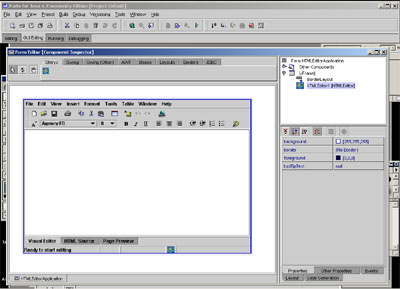
Note: In the demo version most of the development API is disabled - the retail product comes with full API available for development which allows full customization of the editor as well to implement any additional functionalities needed. Contact support@sferyx.com if you are interested in receiving the full javadoc for review of the available functionalities.
|
Packages |
|
| sferyx.administration.editors | Provides the general classes for advanced HTML editing. |
| sferyx.administration.editors.filechooser | Provides supporting functionalities for file browsing and various previews. |
| sferyx.administration.editors.parser | Provides the parser capabilities for the editor |
| sferyx.administration.printing | Contains all classes related to the printing capabilities of the editor |
| sferyx.administration.search | Search functionalities for the editor |
| sferyx.administration.searchreplace | Search & replace functionalities for the editor |
| sferyx.administration.spellyx | Spellchecking capabilities (Enterprise Version Only) |
| sferyx.administration.xmlcomponents | XML mode support classes (Enterprise Version Only) |
| sferyx.administration.editors.pdfexport | Provides full featured PDF Export capabilities when the Sferyx PDFExport add-on is available |
| sferyx.javascript.engine | Basic javascript emulation functionalities for accessing the document elements. (Enterprise Version Only) |
The entire API contains hundreds of different methods - some of them are:
|
Methods |
|
void |
addDocumentListener(javax.swing.event.DocumentListener listener)This method allows DocumentListereners to be added directly to the editor. |
void |
addFormElementsMouseListener(java.awt.event.MouseListener listener)This method is could be used to attach listeners to HTML Form elements such as buttons, lists and drop down menus. |
void |
alignCenterParagraph()When invoked, aligns the selected text centrally |
void |
alignLeftParagraph()When invoked, aligns the selected text to the left |
void |
alignRightParagraph()When invoked, aligns the selected text to the right |
void |
appendContentToContentBuffer(java.lang.String content)Appends new string to existing content buffer. |
void |
applyStyleClass(java.lang.String styleClass)Applies style class to the selection. |
void |
changeFontBackground(java.awt.Color newColor)Sets the selection font foreground |
void |
changeFontFamily(java.awt.Font newFont)sets the selected text's font family. |
void |
changeFontFamily(java.lang.String fontFamily)sets the selected text's font family. |
void |
changeFontForeground(java.awt.Color newColor)Sets the selection font foreground |
void |
changeFontSize(int newFontSize)Sets the selected text's font size. |
void |
closeBufferAndInsert()Closes the existing content buffer and inserts its content inside the editor. |
javax.swing.JButton |
				createMenuButton(javax.swing.JToolBar toolbar,
				java.lang.String tooltipText, java.lang.String actionCommand,
				javax.swing.ImageIcon iconName)
Creates new button and adds it to given toolbar. |
javax.swing.JButton |
				createMenuButton(javax.swing.JToolBar toolbar,
				java.lang.String tooltipText, java.lang.String actionCommand,
				java.lang.String iconName)
Creates new button and adds it to given toolbar. |
javax.swing.JButton |
				createMenuButtonFromAction(javax.swing.JToolBar toolbar,
				java.lang.String tooltipText, java.lang.String actionName)
Creates new button from given action name from the getActions() in HTMLEditorKit and adds it to given toolbar. |
void |
createNewDocument(java.lang.String text)Creates new document with the string content and places it into the editor. |
void |
				createNewDocument(java.lang.String text,
				java.net.URL docBase)
Creates new document with the string content and document base and places it into the editor. |
void |
decreaseIndent()Decreases the indent of the paragraph at the caret position |
void |
deleteSelectedTableCells()Deletes the selected table cells. |
java.lang.String |
dumpContentPortion(int start, int end)Returns the selected portion of the document as formatted text skipping paragraphs tables etc. |
java.lang.String |
dumpDocElement(javax.swing.text.Element elem)Returns the entire content of the element as HTML string. |
java.lang.String |
dumpElementContent(javax.swing.text.Element elem)Returns the content of the element as HTML string without the tags of the passed element. |
java.lang.String |
dumpElementDocumentPortion(javax.swing.text.Element elem)Returns as HTML String the document portion contained within a given element. |
java.lang.String |
dumpSelectedContentPortion()Returns as HTML String the selected document portion. |
java.lang.String |
dumpSelectedDocumentPortion()Returns as HTML String the selected document portion. |
java.lang.String |
dumpSelectedElementContent(javax.swing.text.Element elem) |
boolean |
exit()Invoked when the Exit menu item is pressed on the file menu. |
protected void |
followPreviewInSourceEditor()This method is used to force the Source editor to be updated with the content of the preview. |
protected void |
followPreviewInVisualEditor()This method is used to force the Visual editor to be updated with the content of the preview. |
java.lang.String |
getAdditionalQueryParameters()Returns the additional query parameters to be used when sending the doucment via HTTP POST method |
java.lang.String |
getBodyContent()Returns the content of the editor as a part of HTML document not entire page. |
int |
getBodyContentLenght()Returns the lenght of the HTMLDocument in the editor - this will include all the HTML markup |
java.lang.String |
getBodyContentPortion(int offset, int length)Returns portion of the body content - this should be used in environments where is impossible the whole content at once due to some limitations such as the case of Oracle Forms. |
java.lang.String |
getBodyUnicodeContent()Returns portion of the body content as unicode chars. |
java.lang.String |
getBodyUnicodeContentFromPreview()Returns portion of the body content from the Preview Section. |
java.lang.String |
getContent()Gets the entire content of the document as an HTML string. |
int |
getContentLenght()Returns the length of the content - it will include in the count also all the HTML markup |
java.lang.String |
getContentPortion(int offset, int length)Returns portion of the content - this should be used in environments where is impossible the whole content at once due to some limitations such as the case of Oracle Forms. |
java.lang.String |
getDefaultCharset()Returns the default charset for this document. |
int |
getDocumentSizeLimit()Returns the maximum allowed document length if any has been set. |
javax.swing.JToolBar |
getEditingToolBar()Returns the toolbar that contains all the shortcut buttons for open, save etc. |
javax.swing.ImageIcon |
getEditorIcon(java.lang.String iconName)Returns as ImageIcon one of the loaded images for the buttons and the menus by name. |
int |
getEditorState()Returns the current state of the editor. |
boolean |
getExitOnExit()Return if the editor should exit using System.exit(); when the user presses Exit on the File menu. |
java.lang.String |
getExternalDictionary()Returns the URL of the external dictionary used for spellcheking. |
java.lang.String |
getExternalStyleSheetLocation()Returns the URL as string of the external style sheet loaded and used to apply style classes to the document elements |
javax.swing.JFileChooser |
getFileDialog()Returns the file dialog used to load and save the files. |
javax.swing.JToolBar |
getFormattingToolBar()Returns the toolbar that contains all the formatting buttons such as bold, italic etc. |
javax.swing.JEditorPane |
getInternalJEditorPane()Returns the internal JEditorPane used for editing and rendering in the visual editor. |
java.lang.String |
getLinkedObjectsFolderName()This method is used to retrieve the folder name where all linked objects should be moved upon save. |
javax.swing.JTabbedPane |
getMainTabbedPane()Returns the main tabbed pane that contains all editors - visual, source code, preview - allows full customization. |
java.lang.String |
getPlainText()Gets the entire content of the document as an plain text string. |
int |
getPreferredPasteOperation()Returns the preferred paste operation to be used by the editor. |
javax.swing.JEditorPane |
getPreviewJEditorPane()Returns the internal JEditorPane used for preview and rendering in the visual editor. |
java.lang.String |
getRelativePath(java.lang.String imageURL)Returns the passed path as a path relative to the document base (docbase) - used for inserting of images, hyperlinks etc. |
java.lang.String |
getRemovedMenus()Returns the menus removed previously from the editor. |
java.lang.String |
getRemovedToolbarItems()Returns the previously removed toolbar items. |
boolean |
getSaveEntireDocumentTree()Returns whether the entire document tree should be saved upon saving. |
java.lang.String |
getSelectedEditor()Returns which editor is currently selected. |
javax.swing.JEditorPane |
getSelectedEditorComponent()Returns the currently selected editor component - visual, source code, preview. |
java.lang.String |
getSelectedPlainText()Returns the selected content as plain text |
javax.swing.ImageIcon |
getSharedIcon(java.lang.String iconName)Returns a shared icon which can be used for creating new items with the icons already preloaded Shared icon names are as follows: table-insert, insert-image, undo, redo, spellchecker, hyperlink, font-properties, increase-indent, decrease-indent, font-foreground, copy-to-clipboard, paste-from-clipboard, cut-to-clipboard, font-bold, font-italic, font-underline, left-justify, center-justify, right-justify, insert-ordered-list, insert-unordered-list, file-open, file-save, file-new, file-print, delete-cells, merge-cells, split-cells, form, text-field, text-area, check-box, radio-button, push-button, list |
javax.swing.JPopupMenu |
getSourceEditorPopupMenu()Returns the source editor popup menu. |
java.util.Vector |
getStyleClasses()Returns the array of style classes imported into the editor from style sheets. |
java.lang.String |
getUnicodeContent()Returns the content of the editor as unicode string. |
java.lang.String |
getUnicodeContentFromPreview()Returns the content of the editor as unicode string. |
boolean |
getUploadContentAsMultipartFormData()Returns whether the content of the editor should be uploaded as multipart/form data with all local images bundled inside. |
java.lang.String |
getUploadedObjectsTranslationPath()Returns the translation path to be used before uploading the document content as multipart/form data. |
java.lang.String |
getVariableName()Returns the name of the variable to be used when sending the document content via HTTP POST method. |
javax.swing.JPopupMenu |
getVisualEditorPopupMenu()Returns the popup menu that appears inside the visual editor. |
void |
increaseIndent()Increases the indent of the selection |
void |
insertBreak()Inserts line break <br/> at the caret position. |
void |
insertCheckBox()Inserts new checkbox form field. |
void |
insertContent(java.lang.String content)Will insert the specified HTML content at the caret position |
void |
insertContentAsynchronously(java.lang.String content)This method is used to insert content into the editor without the synchronization locks. |
void |
insertDate()Inserts the current date at the caret position. |
void |
				insertFormField(java.lang.String fieldHtmlString,
				javax.swing.text.html.HTML.Tag filedTagType)
Inserts new form field asspecified into the passed string. |
void |
insertHorizontalLine()Inserts new horizontal line at the caret position. |
void |
insertImage(java.lang.String imageURL)Inserts new image at the caret position into the document given the URL of the image as string. |
void |
insertImageButton(java.lang.String imageURL)Inserts new image button at the caret position using the string URL passed for the image. |
void |
insertLink(java.lang.String text)Inserts new hyperlink over the selected text given the URL of the hyperlink as string. |
void |
insertOrderedList()Inserts ordered list at the caret position. |
void |
insertParagraph()Inserts new paragraph at the caret position. |
void |
insertPlainText(java.lang.String content)Inserts plain text into the editor at the caret position. |
void |
insertPushButton()Inserts new pushbutton form field. |
void |
insertRadioButton()Inserts new radiobutton form field. |
void |
insertSelectFormField()Inserts new select (dropdown menu/list) form field. |
void |
insertSymbol(int unicodeChar)Inserts new unicode symbol at the caret position. |
void |
insertTable(int cols, int rows)Inserts new table at the current caret position, using the passed number of columns and rows. |
void |
insertTableColumn()Inserts new table column in the table at the caret position or does nothing if there is no table |
void |
insertTableRow()Inserts new table row in the table at the caret position or does nothing if there is no table |
void |
insertTextArea()Inserts new textarea form field. |
void |
insertTextField()Inserts new textfield form field. |
void |
insertUnorderedList()Inserts unordered list at the caret position. |
void |
insertUpdate(javax.swing.event.DocumentEvent documentEvent) |
void |
insertWhiteSpace()Inserts white space at the caret position. |
boolean |
isAsYouTypeSpellcheckingEnabled()Returns whether the as-you-type spellchecking is enabled or not. |
boolean |
isBrowsingInPreviewEnabled()Returns whether the browsing in the preview section is activated. |
boolean |
isDocumentEdited()Returns whether the editor has been changed or not. |
boolean |
isEditorTransparent()Returns is the editor has been set to be transparent or not. |
boolean |
isEnabled() |
boolean |
isLocalFileBrowsingDisabled()Returns whether the local file browsing is enabled |
boolean |
isMainMenuVisible()Returns true/false if the main menu (File, Eddit, View etc.) is visible and active or not on the editor. |
boolean |
isPopupMenuVisible()Returns true/false if the popup menu is visible and active or not on the editor. |
boolean |
isPreviewModeOnly()Returns the state of the editor - if is set PreviewModeOnly to true the editor will run only with the preview visible and will work mostly like a browser. |
boolean |
isPreviewVisible()Returns if the preview section is visible and active or not on the editor. |
boolean |
isShowParagraphsEnabled()Method for showing the paragraph marks. |
boolean |
isSingleParagraphSpacing()Returns whether single paragraph spacing generation is enabled or not. |
boolean |
isSourceEditorVisible()Returns true/false if the source editor is visible and active or not on the editor. |
boolean |
isStatusBarVisible()Returns true/false if the status bar is visible and active or not on the editor. |
boolean |
isToolBarVisible()Returns true/false if the toolbar is visible and active or not on the editor. |
boolean |
isVisualEditorFollowsPreview()Returns whether the Visula editor will follow preview when browsing in preview is enabled |
boolean |
isXMLMode()Returns whether the editor will run in XML detection mode. |
void |
loadExternalStyleSheet(java.lang.String externalStyleSheetLocation)Loads external style sheet specified by the given URL and adds its content to the existing style classes. |
void |
				loadExternalStyleSheet(javax.swing.text.html.StyleSheet styleSheet,
				java.lang.String styleSheetURL)
Loads external style sheet specified by the given URL and adds its content to the existing style classes. |
void |
loadInterfaceLanguageFile(java.lang.String fileURL)Loads and renders the interface language file which should be used to localize the UI of the editor |
void |
loadStyleDescriptionsFile(java.lang.String fileURL)This method allows sample style descriptions to be loaded for use in the dropdown combo box. |
void |
mergeSelectedTableCells()Merges the selected table cells. |
void |
openContentBuffer()Ooens the new content buffer for inserting content inside the editor. |
void |
openFile()Shows the FileDialog and opens the selected file |
void |
openFile(java.net.URL fileURL)Opens silently the URL passed, as HTML document for editing |
void |
openLocation()Shows the open location dialog and opens the remote location |
void |
openLocation(java.lang.String location) |
void |
openLocation(java.net.URL location)Opens silently the URL passed, as HTML document for editing |
void |
pasteFilteredFormattedTextFromClipboard()Will paste filtered formatted text into the editor. |
void |
pasteFormattedParagraphsWithoutStyleFromClipboard()Will paste the content of the clipboard scrpping eventually any style information |
void |
pasteFormattedTextFromClipboard()Pastes the content of the clipboard at the current location. |
void |
pastePlainTextFromClipboard(boolean convertLineBreaks)Will get the plain text component of the clipboard and paste it inside the editor. |
void |
performInstantSpellCheck()Will force the spellchecker to performa instant inline spellcheck of the document |
void |
performSpellCheck()Will schedule a spellcheck operation to be performed when possible |
void |
printFile()Shows the print dialog and prints out the edited document |
void |
removeDocumentListener(javax.swing.event.DocumentListener listener)Removes a document listener from the editor. |
void |
removeFormatting()Will remove all the formatting from the selection |
void |
removeFormElementsMouseListener(java.awt.event.MouseListener listener)Will remove a listener which delivers events from the form components |
void |
resetDocumentLenghtLimit()Removes previously imposed document lenght restriction. |
boolean |
saveEntireDocumentTree()Will save the entire documnet tree in a relative folder under the document path. |
boolean |
saveEntireDocumentTree(java.io.File toSaveFile) |
boolean |
saveFile()Shows the FileDialog and saves the file to the selected location. |
void |
setForcedSpanGeneration(boolean genSpan) This will force the editor to generate span rather than font tags. |
void |
				saveToLocation(java.lang.String saveLocation,
				boolean entireFile)
Sends the document content to given URL. |
void |
selectCurrentTable()Selects the table at the caret position or does nothing if there is no table. |
void |
selectCurrentTableCell()Selects the table cell at the caret position or does nothing if there is no table. |
void |
selectCurrentTableColumn() |
void |
selectCurrentTableRow()Selects the table row at the caret position or does nothing if there is no table. |
void |
setAdditionalQueryParameters(java.lang.String additionalQueryParameters)Adds additional query parameters to the content when using HTTP POST method to upload the content to a remote server. |
void |
setAllMenusAndShortcutsStatus(boolean status)Enables/disables the menu items and shortcuts. |
void |
setAsYouTypeSpellcheckingEnabled(boolean enabled) |
void |
setBold()Will update the selection to toggle/set bold attribute |
void |
setBrowsingInPreviewEnabled(boolean enabled)Enables browsing in the preview section. |
void |
setContent(java.lang.String htmlContent)This method creates dynamically new document and inserts the given HTML String as new document content. |
void |
setContentAsynchronously(java.lang.String htmlContent)This method is used to sets the content of the editor without the synchronization locks. |
void |
setDefaultCharset(java.lang.String defaultCharset)Sets the default charset to be used by the editor. |
void |
setDefaultInitialFont(java.lang.String initialFont)Sets the default font family to be used in the editor - this will generate automatically the required font tags in order to reflect the font into the browsers |
void |
setDefaultInitialFontSize(java.lang.String fontSize)Sets the default font size to be used in the editor - this will generate automatically the required font tags in order to reflect the font into the browsers |
void |
				setDocumentLenghtLimit(int limit,
				java.lang.String warningMessage)
Sets the maximum allowed document length if any has been set. |
void |
setEditorTransparent(boolean editorTransparent)This will cause the visual editor to become completely transparent. |
void |
setEnabled(boolean enabled) |
void |
setExitOnExit(boolean exit)Sets the behavior of the editor when "Exit" on the file menu is pressed If this method is invoked with true then the editor will use ask to save changes and then will exit with System.exit(); To be used with caution when being a part of other applications if there are other things to save befor exitting the application The default value is false. |
void |
setExternalDictionary(java.lang.String externalDictionary)Sets the external dictionary URL of the dictionary to be loaded for spellchecking operations -indicates the URL of the dictionary to be used for spell checking. The dictionary should be plain text in the following semicolon delimited format: A=;aa;aaaa;aaaaaa;.....etc; Each line contains all words for a given letter, for example the first line contains all the words beginning with A, the second with B etc. All the words should be in lower case, note the initial and end delimiters. There shouldn't be any white spaces.
|
void |
setExternalStyleSheetLocation(java.lang.String externalStyleSheetLocation)Sets the external style sheet to be loaded and used for rendering and editing of the document. |
void |
setFileDialog(javax.swing.JFileChooser newFileChooser)Sets the file dialog to be used in all browsing operations. |
void |
setFontComboBoxesStatus(boolean status)Sets the status enabled/disabled of the comboboxes on the toolbar - the headings, font family, font size. |
void |
setFontRenderingEnabled(boolean enabled)This allows the font dropdown to be enabled to render its content for each font line or simply to display the font names with standard font. |
void |
setFontRenderingZoom(int relativeIncrease)Specifies the relative redering size of the fonts. |
void |
setHeadingStyle(java.lang.String headingStyle)Sets the heading style of the selected paragraph - the parameters should be in the following format "Heading 1", or "Heading 2" etc. |
void |
setItalic()Will update the selection with the italic attribute - set/toggle it. |
void |
setLinkedObjectsFolderName(java.lang.String linkedObjectsFolderName)This method is used to set the folder name where all linked objects should be moved upon save. |
void |
setLocalFileBrowsingDisabled(boolean disabled)This method will enable/disable the local file dialog when needed. |
void |
setMainMenuVisible(boolean visible)Sets the main menu of the editor (File, Edit ...) visible and active or not. |
void |
setMenuItemsStatus(boolean status)Enables/disable all the menu items |
void |
setPopupMenuVisible(boolean visible)Sets the popup menu of the editor visible and active or not. |
void |
setPreferredPasteOperation(int preferredPasteOperation)Sets the preferred paste operation to be used by the editor. |
void |
setPreserveComments(java.lang.String _preserveComments)This will previent the user from deleting hidden comments into the document |
void |
setPreviewModeOnly(boolean previewModeOnly)Enables the preivew mode only. |
void |
setPreviewVisible(boolean visible)Sets the preview section of the editor visible and active or not. |
void |
setRemovedMenuItems(java.lang.String menuItemNames)setRemovedMenuItems("openLocationMenuItem, printFileMenuItem, closeFileMenuItem,...") - Indicates which menu items should be removed from the menus. |
void |
setRemovedMenus(java.lang.String menuItemNames)setRemovedMenus("menuTools, menuHelp,..") - Indicates which menus should be removed from the main menu bar. |
void |
setRemovedToolbarItems(java.lang.String toolbarItemNames)setRemovedToolbarItems("fontUnderlineButton,fontItalicButton,alignRightButton,fontsList,...") - Indicates which toolbar items should be removed from the tool bars. |
void |
setRestrictedFontList(java.lang.String fontList)
This method allows only certain fonts to be shown in the font list combo. |
void |
setRestrictedFontSizesList(java.lang.String fontSizesList)
This method allows only certain fonts sizes to be shown in the font size list combo. |
void |
setRestrictedHeadingList(java.lang.String headingList)
This method allows only certain headings to be shown in the font list combo. |
void |
setResizeImagesAlwaysKeepAspectRatio(boolean keepAspectRatio)
when set to true image resize operations will always keep the
image aspect ratio |
void |
setSaveEntireDocumentTree(boolean saveEntrireDocTree)Sets whether the entire document tree should be saved upon saving. |
void |
				setSharedIcon(java.lang.String iconName,
				javax.swing.ImageIcon icon)
Replaces a shared icon which can be used for creating new items with the icons already preloaded |
void |
				setShowBodyContentOnlyInSource(java.lang.String
				showBodyContentOnlyInSource)
This method will cause the editor to show only the body content when switching to the HTML source editor. |
void |
setShowParagraphsEnabled(boolean showParagraphsEnabled)Enables/disables revealing of the pragraphs inside the document |
void |
setSingleParagraphSpacing(boolean singleParagraphSpacing)If set to true this method will force the editor to generate single paragraphs spacing whe hitting the enter key - a MS Word like behaviour. |
void |
setSmartWordContentHanldingEnabled(boolean active)Indicates whether should be enable the paste filter or not. |
void |
setSourceCodeModeOnly(boolean sourceCodeModeOnly)If set to true the editor will run in HTML source mode only acting as a simple text editor with synthax highlighting. |
void |
setSourceEditorVisible(boolean visible)Sets the source editor section of the editor visible and active or not. |
void |
setStatusBarVisible(boolean visible)Sets the status bar section of the editor visible and active or not. |
void |
setStatusMessage(java.lang.String message)Sets the given message to the status bar of the HTMLEditor. |
void |
setTableItemsStatus(boolean status)Disbales/enables all the table related menu items, on the basis of the caret position - if there is a table or not. |
void |
setToolbarButtonsStatus(boolean status)Sets all toolbar items status |
void |
setToolBarVisible(boolean visible)Sets the toolbar section of the editor visible and active or not. |
void |
setUnderline()Will update the selection with the underline attribute - set/toggle it. |
void |
				setUploadContentAsMultipartFormData(boolean
				uploadContentAsMultipartFormData)
Indicateds whether the content of the editor should be uploaded as multipart/form-data or as a url-encoded content |
void |
				setUploadedObjectsTranslationPath(java.lang.String
				uploadedObjectsTranslationPath)
Indicates the translation path for local objects when uploaded to the server as multipart/form data. |
void |
setVariableName(java.lang.String variableName)Sets the name of the HTTP POST variable to used for the html content when uploading. |
void |
setVisualEditorFollowsPreview(boolean enabled)This will enable the visual editor to follow the page changes when navigating in the preview. |
void |
setWordWrapMode(boolean active) |
void |
setXMLMode(boolean xmlMode)This will enable the editor to build automatically its own XML grammar for handling XML/XHTML documents. |
void |
showBookmarkPropertiesDialog()Will show the bookmark properties dialog |
void |
showCheckButtonPropertiesDialog()Shows the checkbox form field properties dialog for the form at the caret position or does nothing if there is no checkbox form field. |
void |
showCustomObjectPropertiesDialog()Will show the custom dialog for object tag. |
void |
showFindDialog()Shows the find/search dialog. |
void |
showFontPropertiesDialog()Shows the font properties dialog. |
void |
showFormPropertiesDialog()Shows the form properties dialog. |
void |
showHyperlinkPropertiesDialog()Shows the hyperlink properties dialog and modifies or inserts new hyperlink on the selected text. |
void |
showImageButtonPropertiesDialog()Shows the image button form field properties dialog box which allows change of its parameters or does nothing if there is no image button. |
void |
showInsertImageButtonDialog()Shows the FileDialog to insert an image button. |
void |
showInsertImageDialog()Shows the file dialog to insert an image at the caret position. |
void |
showInsertSymbolDialog()Shows the insert symbol dialog. |
void |
showInsertTableDialog()Shows the insert table dialog which allows the selection of the number of rows and columns and inserts new table |
void |
showListPropertiesDialog()Shows the picture properties dialog box which allows change of the picture parameters at the caret position or does nothing if there is no picture. |
void |
showObjectPropertiesDialog()Will show generic object tag properties dialog. |
void |
showPagePropertiesDialog()Shows the page properties dialog box which allows change of the page parameters such as title, background etc. |
void |
showParagraphPropertiesDialog()Will display the paragraph properties dialog |
void |
showPicturePropertiesDialog()Shows the picture properties dialog box which allows change of the picture parameters at the caret position or does nothing if there is no picture. |
void |
showPushButtonPropertiesDialog()Shows the button form field properties dialog for the form at the caret position or does nothing if there is no button form field. |
void |
showRadioButtonPropertiesDialog()Shows the radio button form field properties dialog for the form at the caret position or does nothing if there is no radio button form field. |
void |
showReplaceDialog()Shows the find/replace dialog. |
void |
showSelectFormFieldPropertiesDialog()Shows the select(dropdown menu or list) form field properties dialog for the form at the caret position or does nothing if there is no select(dropdown menu or list) form field. |
void |
showSpellCheckerDialog()Starts the spellchecker and begins the check of the document. |
void |
showTableCellPropertiesDialog()Shows the table cell properties dialog which allows the customization of the selected table cells or does nothing if there is no table cells selected |
void |
showTablePropertiesDialog()Shows the table properties dialog which allows the customization of the table at the caret position or does nothing if there is no table |
void |
showTextAreaPropertiesDialog()Shows the textarea form field properties dialog for the form at the caret position or does nothing if there is no textarea form field. |
void |
showTextFieldPropertiesDialog()Shows the textfield form field properties dialog for the form at the caret position or does nothing if there is no textfield form field. |
void |
splitSelectedTableCell()Splits the cell at the caret position into two cells horizontally. |
boolean |
				uploadMultipartContent(java.lang.String saveLocation,
				boolean entireFile)
Casues the entire content of the editor to be uploaded to given location as multipart form data. |
void |
wrapNewLineIntoBR(boolean wrap)Sets whether the line breaks should be converted into <br> or into a
<p> |
| void |
setPrintFirstPageHeader(String header)
- Allows to be specified the header for the first page to be
shown on the Print preview and when printing. You can set as a
parameter any html formatted text and include the following
parameter to display the number of each page like this: htmlEditor. setPrintFirstPageHeader ("<h1>This is the First Page Header</h1>"); This will produce a string like This is the First Page Header at the top of the page. You can set any HTML attributes and elements including images etc. to format the output as you need.. For the rest of the pages please see setPrintHeader method |
| void |
setPrintHeader(String header)
- Allows to be specified the headers to be shown on
the Print preview and when printing. You can set as a parameter
any html formatted text and include the following parameter to
display the number of each page like this:
htmlEditor.setPrintHeader("<h1>This is a Page Header</h1>");
This will produce a string like
This is a Page Header at the top of the page. You can set any
HTML attributes and elements including images etc. to format the
output as you need. If you need to set different header for the first page only, please see setPrintFirstPageHeader method
|
| void |
setPrintFooter(String footer)
- Allows to be specified the footers to be shown on the Print
preview and when printing. You can set as a parameter any html
formatted text and include the following parameter to display
the number of each page like this:
htmlEditor.setPrintFooter("<h4>This is a Page Footer</h4>"); This will produce a string like This is the Page Footer at the bottom of the page. You can set any HTML attributes and elements including images etc. to format the output as you need.. |
| void |
setPrintPageNumber(String pageNumber) - Allows to be
specified the page numbers to be shown on the Print preview and
when printing. You can set as a parameter any html formatted
text and include the following parameter to display the number
of each page like this:
htmlEditor. setPrintPageNumber ("<h4 align=right>Page
@#SferyxHTMLEditor-PageNumber#@</h4>");
This will produce a string like
Page 1 at the right bottom corner of the page. You can set any
HTML attributes and elements including images etc. to format the
output as you need.
|
| void |
setUsePrintCSSForPDFExport(boolean use)
- this specifies whether to use the same print style sheet also
for the PDFExport |
| boolean | isUsePrintCSSForPDFExport() - returns if the same settings for printing should be used with the PDFExport |
| void | setDefaultPageFormatForPDFExport(PageFormat pageFormat) - Sets the default PageFormat to be used by the PDFExport when available. By defautl the PageFormat dialog will be displayed to the user to select the paper size and margins. |
| PageFormat | getDefaultPageFormatForPDFExport() - Returns the default PageFormat to be used by the PDFExport when available. By defautl the PageFormat dialog will be displayed to the user to select the paper size and margins. |
| void | setDefaultPrintPreviewDimension(Dimension dimension) - Specifies the default size for the print preview dialog - if not specified it will be set by default of 80% of the screen size |
| void setEscapeEntities(boolean escape) - if set to false the HTML entities will not be escaped and will be outputted the characters as they are - this can be useful for environments which do not recognize the entities such as Oracle Forms or similar.. | |
| void | setWriteBRInsteadOfAutomaticNBSP(boolean write) - if set to true, the default output for empty paragraphs will be <p><br/></p> and not the default <p> </p> - this is useful for compatibility with some frameworks and printing environments which do not recognize properly the paragraph breaks. |
| void | setWrapParagraphLinesAlwaysOnBodySize(boolean wrap) - if specified this will cause the editor to force lines to wrap on the body size even if there are no spaces or line breaks. This is useful to prevent very long non breakable lines when needed. |
| void | setExternalStyleSheetForPrint(String externalStyleSheetLocation) - Loads external style sheet for printing specified by the given URL. The newly loaded classes will be used for printing or PDFExport if specified. Alòternatively you can include the following tag inside the document: <link media="print" href="http://host/print.css" type="text/css" rel="stylesheet" /> |
| void | setPageLayoutView(boolean enabled) -Turns on/off the page layout of the entire document - this is very useful to see how the document actually would look when printed - it simulates the MS Word print layout view. This method will use the default system PageFormat for the layout. You can change the default page format using the method setDefaultPrintPageFormat(PageFormat pageFormat); |
| void setPageLayoutView(PageFormat pageFormat) -Turns on/off the page layout of the entire document - this is very useful to see how the document actually would look when printed - it simulates the MS Word print layout view. With this method you can specify also the page size to be used. | |
| void | setZoomEverything(boolean zoom) -Turns on/off the zooming of the entire page, now this is enabled by default. If turned off, only the text zoom will be available. |
| void |
setImageQualityRenderingHints(Map hints)
- If specified - these rendering hints will be used to render
images inside the editor - this should be used together with
setHighQualityImageScalingEnabled(true) |
| void | setHighQualityImageScalingEnabled(boolean enabled) - If enabled the scaling of the resized images will be made using high quality algorithm which could lead to slower performance for large images. |
| boolean | isHighQualityImageScalingEnabled() - returns if high quality scaling is enabled |
| String | getFOXMLContent() - Returns the entire content of the element as FO XML string. Now is possible to export the content as FO XML format for immediate conversion to PDF or RTF using Apache FOP |
| int | getFOXMLContentLenght() - Returns the length of the FO XML content - it will include in the count also all the FO XML markup |
| String |
getFOXMLContentPortion(int offset, int
length) -
Returns portion of the FO XML content - this should be used in
environments where is impossible the whole content at once due
to some limitations such as the case of Oracle Forms. This
should be used in conjunction with getFOXMLContentLength() and
make loop for retrieving all pieces. These methods will return directly the converted content and formatted as FO XML which is ready to be converted in PDF or RTF using Apache FOP for example or the same in Oracle BI Publisher |
| JComponent | getToolbarItemByName(String toolbarItemName) - Returns a toolbar item by its name - this allows the full customization of the tool bars of the editor - you can change icons, size, add listeners etc The full list of the tool bar items see the user manual |
| boolean | isWrapTextInHTMLSourcePane() - Returns if the wrap of the text in the HTML source pane is enabled or not. |
| void | setWrapTextInHTMLSourcePane(boolean wrap) - Sets whether to wrap the text in the HTML source pane or not. |
| void | addAddToDictionaryActionListener(ActionListener listener) which will allow you to manage addToDictionary button . |
| void | setLoadLocalImagesAlways(boolean loadImages) - Specifies to load always the local images in the document even if setDontLoadDocumentImages is set to true |
| boolean | boolean isLoadLocalImagesAlways() - returns if the loading of local images is enabled always even if list conversion is enabled |
| void | setConvertAutomaticallyMSWordListsOnPaste(boolean convert) - if set to true the editor will detect and convert the MS formatting for lists which otherwise are pasted as normal paragraphs.The default value is false - this needs to be set to true to convert lists automatically. |
| boolean | isConvertAutomaticallyMSWordListsOnPaste() - returns if the automatic list conversion is enabled |
| static void | setForcedFontTagGeneration(boolean genFont) - This will force the editor to generate font tags rather than span tags. |
| static boolean | isForcedFontTagGeneration() - Returns true if the editor is forced to generate font tags rather than span tags. |
| static void | setRenderInvisibleContent(boolean render) - Will force the rendering of the HTML content of the editor even if the editor is not visible and not added to a container. Can be used for creating offscreen images or other automation tasks. |
| static boolean |
isRenderInvisibleContent() -
Returns if rendering of the HTML content of the edtor even if
tbhe editor is not visible and not added to a container is
enabled. |
| static void |
setInsertEditableSpace(boolean insertEd)
- Enables/disables the automatic insertion of editable space
between adjacent block elements where is difficult to place the
cursor and insert text. The default is false |
| static boolean | isInsertEditableSpace() - returns if the automatic insertion of editable space between adjacent bloack elements is enabled |
| void | setAdjustScaleForHiDPI(boolean adjust) - Specifies whether to enforce scaling on HiDPI monitors to make the dialogs usable. The default is true |
| boolean | isAdjustScaleForHiDPI() - Returns whether is set to enforce scaling on HiDPI monitors to make the dialogs usable. The default is set to true. |
| void | saveAsEmailMessageFile(File f) - Saves the entire content of the editor as Multipart e-mail message .eml file including all the images embedded inside. It can be opened in email clients like Outlook, Thunderbird etc. |
| boolean | saveAsEmailMessageFile() - Opens a file dialog and saves the entire content of the editor as multipart e-mail mesaage file .eml - it will include also all images inside. It can be opened in email clients like Outlook, Thunderbird etc. |
| void | saveAsEmailMessageFile(String file) - Saves the entire content of the editor as multipart e-mail mesaage file .eml - it will include also all images inside. It can be opened in email clients like Outlook, Thunderbird etc. |
| boolean |
sendEntireContentAsEmailMessage (String
mailHost, int port, String from, String to, String subject)
- Sends as an e-mail the entire content of
the editor including all images, formatting etc. as multipart
mime message via the given SMTP mail server and port using the
"from" address as sender, "to" as recipient and "subject" as
subject of the message. The message will be sent using the SMTP
protocol and will return true if the e-mail has been sent
successfully, false in case of error.
Now is possible to send the entire content of the editor via e-mail instantly including all images and formatting with a single method call: htmlEditor. sendEntireContentAsEmailMessage ("smtp.your_host.com", 25, "info@some_host.com", "somebody@other_host.com", "Another info request"); |
| boolean |
isPrintingCancelled()
- returns if the last print operation has
been cancelled by the user |
| void | resetPrintingCancelled() - resets the last printing by the user status - see the isPrintingCancelled for more information |
| void |
executeHTMLEditorActionCommand(String
actionCommand)
- this allows to simulate
button clicks and this way can be used to create your own
buttons in the host application as they were editor's toolbar
buttons. Here below is the list with commands which can be used: "increase-indent" - increases the indent of the paragraph at the caret position "decrease-indent" - decreases the indent of the paragraph at the caret position "picture-properties" - shows the picture properties dialog box which allows change of the picture parameters at the caret position or does nothing if there is no picture. "imagebutton-properties" - shows the image button form field properties dialog box which allows change of its parameters or does nothing if there is no image button. "page-properties" - shows the page properties dialog box which allows change of the page parameters such as title, background etc. "table-select" - selects the table at the caret position or does nothing if there is no table. "table-row-select" - selects the table row at the caret position or does nothing if there is no table. "design-table" - shows the design table popup of the toolbar. "table-insert-row" - inserts new table row in the table at the caret position or does nothing if there is no table "table-insert-column" - inserts new table column in the table at the caret position or does nothing if there is no table "table-insert" - shows the insert table dialog which allows the selection of the number of rows and columns and inserts new table "start-spellchecker" - starts the spellchecker and begins the check of the document. "selectall-action" - selects the entire document. "find-action" - shows the find/search dialog. "replace-action" - shows the find/replace dialog. "table-properties" - shows the table properties dialog which allows the customization of the table at the caret position or does nothing if there is no table "cell-properties" - shows the table cell properties dialog which allows the customization of the selected table cells or does nothing if there is no table cells selected "table-cell-merge" - merges the selected table cells and. "table-cell-split" - splits the cell at the caret position into two cells horizontally. "hyperlink-properties" - shows the hyperlink properties dialog and modifies or inserts new hyperlink on the selected text "form-properties" - shows the form properties dialog for the form at the caret position or does nothing if there is no form. "button-properties" - shows the button form field properties dialog for the form at the caret position or does nothing if there is no button form field. "radiobutton-properties" - shows the radio button form field properties dialog for the form at the caret position or does nothing if there is no radio button form field. "checkbox-properties" - shows the checkbox form field properties dialog for the form at the caret position or does nothing if there is no checkbox form field. "textfield-properties" - shows the textfield form field properties dialog for the form at the caret position or does nothing if there is no textfield form field. "textarea-properties" - shows the textarea form field properties dialog for the form at the caret position or does nothing if there is no textarea form field. "selectfield-properties" - shows the select (dropdown menu or list) form field properties dialog for the form at the caret position or does nothing if there is no select (dropdown menu or list) form field. "font-foreground" - sets the selected text's font foreground color visualizing the ColorChooser "font-family" - sets the selected text's font family from the combobox on the toolbar "font-size" - sets the font size "insert-textfield" - inserts new textfield form field. If there is no form at the current caret position, creates new one. "insert-textarea" - inserts new textarea form field. If there is no form at the current caret position, creates new one. "insert-checkbox" - inserts new checkbox form field. If there is no form at the current caret position, creates new one. "insert-radiobutton" - inserts new radiobutton form field. If there is no form at the current caret position, creates new one. "insert-pushbutton" - inserts new pushbutton form field. If there is no form at the current caret position, creates new one. "insert-select" - inserts new select (dropdown menu/list) form field. If there is no form at the current caret position, creates new one. "insert-imagebutton" - inserts new imagebutton form field visualizing the file dialog to select the image URL. If there is no form at the current caret position, creates new one. "insert-hr" - inserts new horizontal line <hr> at the caret position. "insert-br" - inserts line break at the caret position. "insert-p" - inserts new paragraph at the caret position. "insert-space" - inserts white space at the caret position. "insert-image" - inserts new image at the caret position, visualizing the file dialog. "font-properties" - shows the font properties dialog. "file-print" - shows the print dialog and prints out the current page. "file-save" - saves the current page, visualizing the file dialog. "file-open" - opens a new file showing the file dialog. "location-open" - opens a new file (URL) showing open location dialog. "file-new" - creates new empty file. "file-exit" - exits from the editor, using System.exit() asking to save the changes "help-about" - exits from the editor, using System.exit() asking to save the changes "copy-action" - performs copy formatted text action and copies the selection as formatted paragraphs, ready to be pasted into tables. "paste-action" - performs paste formatted text action. "new-editor-window" - creates new editor frame "text-uppercase" - convert text to uppercase "text-lowercase" - convert text to lowercase "text-titlecase" - convert text to title case "text-sentencecase" - convert text to sentence case "increase-font" - increase font size "decrease-font" - descrease font size "add-word-to-dictionary" - adds word to the custom dictionary "edit-hotspot" - modifies image map hotspot "image-map-rect" - inserts restangle image map hotspot "image-map-circle" - inserts circle image map hotspot "image-map-poly" - inserts polygon image map hotspot "pdfexport" - exports document as PDF through the PDFExport plug-in "zoomin-text" -increases the zoom of the page "zoomout-text" - decreases the zoom of the page "insert-equation" - inserts equation through the equation editor plug-in "edit-equation" - edits equation through the equation editor plug-in "strikethrough" - strikethough the selected text "font-underline" - underline the selected text "subscript" - converts text to subscript "superscript" - converts text to superscript "preview-go-backward" - go back on the preview pane "preview-go-forward" - go forward on the preview pane "show-paragraphs" - shows the paragraphs inside the document "file-save-docx" - saves the content of the editor as MS Word Docx file. "file-save-mail"- saves the content of the editor as standard e-mail format and creates .eml file which can be opened in MS Outlook, Thunderbird etc. |
| void | openDocxFile(File file) - opens MS Word DOCX (.docx) file silently and imports it into the editor for editing |
| void | switchExternalDictionary(String externalDictionary) - Switches to a given dictionary specified by its location as URL in the externalDictionary parameter.This way can be easily implemented languages switch at runtime. |
| void | loadDefaultDictionary() - Loads the default internal English dictionary for spellchecking operations. |
| void | setExternalStyleSheetForPrint(String externalStyleSheetLocation) - Loads external style sheet for printing specified by the given URL. The newly loaded classes will be used for printing or PDFExport if specified. |
| void | setPageLayoutView(boolean enabled) -Turns on/off the page layout of the entire document - this is very useful to see how the document actually would look when printed - it simulates the MS Word print layout view. |
| void | setPageLayoutView(PageFormat pageFormat) -Turns on/off the page layout of the entire document - this is very useful to see how the document actually would look when printed - it simulates the MS Word print layout view. With this method you can specify also the page size to be used. |
| void |
setPrintFirstPageHeader(String header) - Allows to
be specified the header for the first page to be shown on the
Print preview and when printing. You can set as a parameter any
html formatted text and include the following parameter to
display the number of each page like this: htmlEditor.setPrintFirstPageHeader("<h1>This is the First Page Header</h1>"); This will produce a string like This is the First Page Header at the top of the page. You can set any HTML attributes and elements including images etc. to format the output as you need. For the rest of the pages please see setPrintHeader method |
| void |
setPrintHeader(String header)
- Allows to be specified the headers to be shown on
the Print preview and when printing. You can set as a parameter
any html formatted text and include the following parameter to
display the number of each page like this:
htmlEditor.setPrintHeader("<h1>This is a Page Header</h1>");
This will produce a string like
This is a Page Header at the top of the page. You can set any
HTML attributes and elements including images etc. to format the
output as you need. If you need to set different header for the first page only, please see setPrintFirstPageHeader method |
| void |
setPrintFooter(String footer) - Allows to be
specified the footers to be shown on the Print preview and when
printing. You can set as a parameter any html formatted text and
include the following parameter to display the number of each
page like this:
htmlEditor.setPrintFooter("<h4>This is a Page Footer</h4>"); This will produce a string like This is the Page Footer at the bottom of the page. You can set any HTML attributes and elements including images etc. to format the output as you need. |
| void | setPrintPageNumber(String pageNumber) - Allows to be specified the page numbers to be shown on the Print preview and when printing. You can set as a parameter any html formatted text and include the following parameter to display the number of each page like this: htmlEditor. setPrintPageNumber ("<h4 align=right>Page @#SferyxHTMLEditor-PageNumber#@</h4>"); This will produce a string like Page 1 at the right bottom corner of the page. You can set any HTML attributes and elements including images etc. to format the output as you need. |
| void | setUsePrintCSSForPDFExport(boolean use) - this specifies whether to use the same print style sheet also for the PDFExport |
| boolean | isUsePrintCSSForPDFExport() - returns if the same settings for printing should be used with the PDFExport |
| void | setDefaultPageFormatForPDFExport(PageFormat pageFormat) - Sets the default PageFormat to be used by the PDFExport when available. By defautl the PageFormat dialog will be displayed to the user to select the paper size and margins. |
| PageFormat | getDefaultPageFormatForPDFExport() - Returns the default PageFormat to be used by the PDFExport when available. By defautl the PageFormat dialog will be displayed to the user to select the paper size and margins. |
| void | setDefaultPrintPreviewDimension(Dimension dimension) - Specifies the default size for the print preview dialog - if not specified it will be set by default of 80% of the screen size |
| void | setEscapeEntities(boolean escape) - if set to false the HTML entities will not be escaped and will be outputted the characters as they are - this can be useful for environments which do not recognize the entities such as Oracle Forms or similar. |
| void |
setWriteBRInsteadOfAutomaticNBSP(boolean write) - if
set to true, the default output for empty paragraphs will be
<p><br/></p> and not the default <p> </p> - this is useful
for compatibility with some frameworks and printing environments
which do not recognize properly the paragraph breaks. |
| void | setWrapParagraphLinesAlwaysOnBodySize(boolean wrap) - if specified this will cause the editor to force lines to wrap on the body size even if there are no spaces or line breaks. This is useful to prevent very long non breakable lines when needed. |
| void | importFiles(File[] files) - imports all the files at the caret position - the imported files if containing HTML content will be converted accordingly for full import as this would be done when pasting the content. |
| void | setZoomEverything(boolean zoom) -Turns on/off the zooming of the entire page, now this is enabled by default. If turned off, only the text zoom will be available. |
| void | setImageQualityRenderingHints(Map hints) - If specified - these rendering hints will be used to render images inside the editor - this should be used together with setHighQualityImageScalingEnabled(true) |
| void | setHighQualityImageScalingEnabled(boolean enabled) - If enabled the scaling of the resized images will be made using high quality algorithm which could lead to slower performance for large images. |
| boolean | isHighQualityImageScalingEnabled() - returns if high quality scaling is enabled |
| String |
getFOXMLContent() - Returns the entire content of the
element as FO XML string. |
| int |
getFOXMLContentLenght() -
Returns the length of the FO XML content - it will include
in the count also all the FO XML markup |
| String |
getFOXMLContentPortion(int offset, int
length) -
Returns portion of the FO XML content - this should be used in
environments where is impossible the whole content at once due
to some limitations such as the case of Oracle Forms. This
should be used in conjunction with getFOXMLContentLength() and
make loop for retrieving all pieces. |
| JComponent | getToolbarItemByName(String toolbarItemName) - Returns a toolbar item by its name - this allows the full customization of the tool bars of the editor - you can change icons, size, add listeners etc The full list of the tool bar items see the user manual |
| boolean | isWrapTextInHTMLSourcePane() - Returns if the wrap of the text in the HTML source pane is enabled or not. |
| void | setWrapTextInHTMLSourcePane(boolean wrap) - Sets whether to wrap the text in the HTML source pane or not. |
| void | addAddToDictionaryActionListener(ActionListener listener) which will allow you to manage addToDictionary button events. |
| String | getHrefAtPoint(int x, in y) - returns if there is a link at the point where you have clicked on the document and if there is a link it returns the URL contained in the href so you can use it as you wish - isn't this what you need? |
| public void |
writeContentAsMultipartMimeMessageToStream(OutputStream os)
throws Exception - Writes the content of the editor as
multipart MIME e-mail message format data including all images. |
| String |
getContentAsMultipartMimeMessage() -
returns a String with the content of the editor as multipart
MIME e-mail message format data including all images |
| void |
writeMultipartContentToStream(OutputStream os, boolean
entireFile) throws Exception - Writes the multipart
form data generated by the editor to be written to an arbitrary
stream. entireFile parameter indicates whether the entire html content to be written or only the body part of it. The developer should take care about the handling of open/close of the stream in a proper way. |
| int |
getMultipartMimeMessageContentLength()
- Returns the length of the content as multipart MIME e-mail
message format data. |
| String | getMultipartMimeMessageContentPortion(int offset, int length) - Returns portion of the content as multipart MIME e-mail message format data - this should be used in environments where is impossible the whole content at once due to some limitations such as the case of Oracle Forms. This should be used in conjunction with getContentLength() and make cycle for retrieving all pieces through getMultipartMimeMessageContentPortion(int start, in length) |
| void |
setMSWordStyleTables(boolean MSWordStyleTables) -
if set to true this method will force the editor to
generate newly inserted tables to be a Microsoft Word like style
with black borders and no spacing instead of the default
invisible ones. |
| boolean | isMSWordStyleTables() - Returns whether newly inserted tables are in Microsoft Word style. |
| void |
setEmbedAllImagesInsideTheDocument(boolean embed) -
if this is set to true, you can retrieve the document HTML and
all the images by simply using getContent() or getBodyContent(). This method enables the editor to embed all document
images inside the HTML code which is retrieved using
getContent(), getBodyContent() methods. This way is possible
to create fully self contained documents to be saved as simple
strings inside database fields (for example CLOB or similar) or
even simple text files. You can even retrieve the entire
documents easily in a client-server environment by simply
getting the document content. This feature can also be very
useful in the creation of e-mail like applications for embedding
all images inside the message body. |
Customization of the user interface
The Sferyx JSyndrome HTMLEditor Component Edition offers zero efforts full customization of the user interface also directly from inside the IDE. Using the following methods you can remove menus, menu items or toolbar items in order to make the HTMLEditor bean fit your needs.
Removing menu items:
	setRemovedMenuItems("openLocationMenuItem,
          printFileMenuItem, closeFileMenuItem,...")
-
Indicates which menu items should be removed from the menus. This list
contains comma separated names of the menu items contained within the
editor to be removed. This allows the full customization of the dropdown
menus inside the main menu. The full list is:
File Menu
newFileMenuItem - new file menu item on the "File" menu
openFileMenuItem - open file menu item on the "File" menu
openLocationMenuItem - open location menu item on the "File" menu
closeFileMenuItem - close file menu item on the "File" menu
saveFileMenuItem - save file menu item on the "File" menu
saveasFileMenuItem - save remote file menu item on the "File" menu
printFileMenuItem - print file menu item on the "File" menu
exitFileMenuItem - close file menu item on the "File" menu- returns whether the embedding of images is enabled.
saveasDocxFileMenuItem- returns whether the embedding of images is enabled. - save as MS Word docx menu item on the "File" menu
saveasMailFileMenuItem- returns whether the embedding of images is enabled. - save as Outlook .eml e-mail file menu item on the "File" menu
openDocxFileMenuItem- returns whether the embedding of images is enabled. - open MS Word docx file menu item on the "File" menu
Edit Menu
copyMenuItem -copy menu item on the "Edit" menu
cutMenuItem - cut menu item on the "Edit" menu
pasteMenuItem - paste menu item on the "Edit" menu
copyFormattedTextMenuItem - copy formatted text menu item on the "Edit" menu
pasteFormattedTextMenuItem- paste formatted text menu item on the "Edit" menu
selectAllMenuItem - select all menu item on the "Edit" menu
findMenuItem - find menu item on the "Edit" menu - professional version
replaceMenuItem - replace menu item on the "Edit" menu - professional version
Insert Menu
insertBreakMenuItem - insert break menu item on the "Insert" menu
insertParagraphMenuItem - insert paragraph menu item on the "Insert" menu
insertSpaceMenuItem - insert space menu item on the "Insert" menu
horizontalLineMenuItem - insert horizontal line menu item on the "Insert" menu
insertDateMenuItem - insert date menu item on the "Insert" menu
insertSymbolMenuItem - insert symbol menu item on the "Insert" menu
insertFormFieldTextBoxMenuItem - insert text box menu item on the "Insert -> Form" menu
insertFormFieldTextAreaMenuItem - insert text area menu item on the "Insert -> Form" menu
insertFormFieldCheckBoxMenuItem - insert check box menu item on the "Insert -> Form" menu
insertFormFieldRadioButtonMenuItem - insert radio button menu item on the "Insert -> Form" menu
insertFormFieldDropDownMenuItem - insert drop down menuitem on the "Insert -> Form" menu
insertFormFieldPushButtonMenuItem - insert push button menu item on the "Insert -> Form" menu
insertFormFieldImageButtonMenuItem - insert image button menu item on the "Insert -> Form" menu
insertInsertImageMenuItem - insert image menu item on the "Insert" menu
insertInsertHyperlinkMenuItem - insert hyperlink menu item on the "Insert " menu
Table Menu
insertTableMainMenuItem - insert table menu item on the "Table" menu
insertTableRowMainMenuItem - insert table row menu item on the "Table" menu
insertTableColumnMainMenuItem - insert table column menu item on the "Table" menu
deleteTableCellsItem - delete table column menu item on the "Table" menu
selectTableMenuItem - select table menu item on the "Table" menu
selectTableColumnMenuItem - select table column menu item on the "Table" menu
selectTableRowMenuItem - select table row menu item on the "Table" menu
selectTableCellMenuItem - select table cell menu item on the "Table" menu
splitTableCellMenuItem - split table cell menu item on the "Table" menu
mergeTableCellMenuItem - merge table cell menu item on the "Table" menu
tablePropertiesMainMenuItem - table properties menu item on the "Table" menu
tableCellPropertiesMainMenuItem - table cell properties menu item on the "Table" menu
Window Menu
newWindowMenuItem - new window menu item on the "Window" menu
Format Menu
fontPropertiesMainMenuItem - font properties menu item on the "Format" menu
pagePropertiesMainMenuItem - page properties menu item on the "Format" menu
upperCaseMenuItem - convert to upper case menu item
lowerCaseMenuItem - convert to lower case menu item
titleCaseMenuItem - convert to title case menu item
sentenceCaseMenuItem - convert to sentence case menu item
View Menu
viewStatusBarMenuItem - view status bar menu item on the "View" menu
viewToolBarMenuItem - view tool bar menu item on the "View" menu - professional version
viewSourceEditorMenuItem - view source editor menu item on the "View" menu - professional version
viewPagePreviewMenuItem - view preview menu item on the "View" menu - professional version
Help Menu
aboutFileMenuItem - about menu item on the "Help" menu
Removing entire menus:
setRemovedMenus("menuTools, menuHelp,..")
- Indicates which menus should be
removed from the main menu bar. This list contains comma separated names
of the menus contained within the editor's main menu bar to be removed.
This allows the full customization of the menus inside the main menu
bar. The full list of the menus is:
Main Menus:
menuFile - the File menu on the main menu bar - will remove the entire menu;
menuEdit - the Edit menu on the main menu bar - will remove the entire menu;
menuView - the View menu on the main menu bar - will remove the entire menu;
menuInsert - the Insert menu on the main menu bar - will remove the entire menu;
menuFormat - the Format menu on the main menu bar - will remove the entire menu;
menuTools - the Tools menu on the main menu bar - will remove the entire menu;
menuTable - the Table menu on the main menu bar - will remove the entire menu;
menuWindow - the Window menu on the main menu bar - will remove the entire menu;
menuHelp - the Help menu on the main menu bar - will remove the entire menu;
Submenus:
menuInsertTable - the Insert menu inside the Table main menu - will remove the entire menu;
menuSelectTable - the Select menu inside the Table main menu - will remove the entire menu;
menuPropertiesTable - the Properties menu inside the Table main menu - will remove the entire menu;
menuForm - the Form menu inside the Insert main menu - will remove the entire menu;
Removing toolbar items:
setRemovedToolbarItems("fontUnderlineButton, fontItalicButton, alignRightButton,fontsList,...")
- Indicates which toolbar items should
be removed from the tool bars. This list contains comma separated names
of the toolbar items contained within the editor's tool bars to be removed.
This allows the full customization of the tool bars of the editor. The
full list of the tool bar items is:
insertImageButton - the insert image toolbar button;
tableBtn - the insert table toolbar button;
undoButton - the undo toolbar button;
redoButton - the redo toolbar button;
insertHyperlinkButton - the insert hyperlink toolbar button;
increaseIndentButton - the increase indent toolbar button;
decreaseIndentButton - the decrease indent toolbar button;
fontSizeButton - the font properties button;
setForegroundButton - the font foreground toolbar button;
unorderedListButton - the unordered list toolbar button;
orderedListButton - the ordered list toolbar button;
newFileButton - the new file toolbar button;
openFileButton - the open file toolbar button;
saveFileButton - the save file button;
printFileButton - the print file button;
pasteButton - the paste toolbar button;
copyButton - the copy toolbar button;
cutButton - the cut toolbar button;
alignRightButton - the align right toolbar button;
alignCenterButton - the align center toolbar button;
alignLeftButton - the align left toolbar button;
fontUnderlineButton - the font underline toolbar button;
fontStrikethroughButton- the strikethrough toolbar button
fontItalicButton - the font italic toolbar button;
fontBoldButton - the font bold toolbar button;
fontStrikethroughButton - the strikethrough button on the toolbar.
copyFormattingButton - the copy formatting toolbar button;
fontsList - the fonts list toolbar combo box;
fontSizes - the font sizes toolbar combo box;
headingStyles - the headings toolbar combo box;insertTableButton - insert table toolbar button
insertTableRowButton - insert row toolbar button
insertTableColumnButton - insert column toolbar button
deleteTableCellsButton - delete table cells toolbar button
selectTableButton - select table toolbar button
selectTableColumnButton - select table column toolbar button
selectTableRowButton - select table row toolbar button
selectTableCellButton - select table cell toolbar button
splitTableCellButton - split table cell toolbar button
mergeTableCellButton - merge table cell toolbar button
tablePropertiesButton - table properties toolbar button
tableCellPropertiesButton - table cell properties toolbar buttonstyleClasses - the style classes toolbar combo box
showParagraphsButton - the button for revealing paragraphs
fontBackgroundButton - font background (text highlight) button
insertEquationButton - the button for inserting mathematical equations through Sferyx EquationEditoralignJustifyButton - the button for align justify paragraphs
superscriptButton - the button for superscipt
subscriptButton - the button for subscript
insertSymbolButton- the button for inserting symbolstableToolbarSeparator- the separator between the table items
pasteToolbarSeparator- the separator between the pasting items
undoToolbarSeparator- the separator between the undo items
saveToolbarSeparator- the separator between save itemstableInsertItemsToolbarSeparator - the separator between the table insert items
tableSelectItemsToolbarSeparator - the separator between the table select itemsprintToolbarSeparator - the separator before the print item
fontToolbarSeparator - the separator between formatting items
fontStyleToolbarSeparator - the separator before the style combo
alignmentToolbarSeparator - the separator before the paragraph alignment items
listsToolbarSeparator- the separator before the list itemszoomoutTextButton - the text zoom out button
zoominTextButton - the text zoom in button
pdfExportButton - the PDF export toolbar button when enabledimageMapRectButton - the image map insert rectangle button
imageMapCircleButton - the image map insert circle button
imageMapPolyButton - the image map insert polygon buttonreplaceTextButton - replace text toolbar button
findTextButton - find text toolbar button
bordersToolbarButton - edit borders toolbar buttonincreaseFontSizeButton - the increase font size button
decreaseFontSizeButton - the decrease font size button
spellCheckerButton - the spellchecker button
spellCheckerAYTButton - the as-you-type spellchecker button
printPreviewButton - the print preview button
pageLayoutButton - the page layout view button
saveasDocxButton- returns whether the embedding of images is enabled. - save as MS docx file button on the toolbar
openDocxButton- returns whether the embedding of images is enabled. - open MS docx file button on the toolbar
Removing items from the popup menu- returns whether the
embedding of images is enabled.
setRemovedPopupMenuItems("listPropertiesMenuItem, insertTableRowMenuItem...")
- returns whether the
embedding of images is enabled.- Indicates which toolbar items should be removed from the main
popup menu. This list contains comma separated names of the
popup menu items contained within the editor's main popup bar to
be removed. This allows the full customization of the tools
inside the main popup menu. The full list of the items is:
- returns whether the embedding of images is enabled.listPropertiesMenuItem - list properties popup menu item, appears when the cursor is placed over a list
insertTableRowMenuItem - insert table row popup menu item
insertTableCellMenuItem - insert table cell popup menu item
insertTableMenuItem - insert table row popup menu item
imagePropertiesMenuItem - image properties popup menu item, appears when there is an image selected
imageButtonFieldPropertiesMenuItem - image button properties popup menu item, appears when there is an image button selected
formPropertiesMenuItem - form button properties popup menu item, appears when there is a form
buttonFieldPropertiesMenuItem - button properties popup menu item, appears when there is a button selected
radioButtonFieldPropertiesMenuItem - radio button properties popup menu item, appears when there is a radio button selected
checkBoxFieldPropertiesMenuItem - check box properties popup menu item, appears when there is a check box selected
textFieldPropertiesMenuItem - text field properties popup menu item, appears when there is a text field selected
textAreaFieldPropertiesMenuItem - text area properties popup menu item, appears when there is a text area selected
selectFieldPropertiesMenuItem - select(list) field properties popup menu item, appears when there is a select field(list) selected
tablePropertiesMenuItem - table properties popup menu item, appears when there is a table at the cursor position
tableCellPropertiesMenuItem - table cell properties popup menu item, appears when there is a table at the cursor position
pagePropertiesMenuItem - page properties popup menu item
mergeItem - merge table cells properties popup menu item, appears when there is a table at the cursor position
splitItem - split table cell properties popup menu item, appears when there is a table at the cursor position
hyperlinkPropertiesPopupMenuItem - hyperlink properties popup menu item
fontPropertiesMenuItem - font properties popup menu item
objectPropertiesMenuItem - object properties popup menu item
paragraphPropertiesPopupMenuItem - paragraph properties popup menu item
copyItem - copy formatted text popup menu item
copyPlainTextMenuItem - copy plain text popup menu item
pasteItem - paste formatted text popup menu item
copyPopupMenuItem - copy popup menu item
pastePopupMenuItem - paste popup menu item
cutPopupMenuItem - cut popup menu item
boldPopupMenuItem - bold popup menu item
italicPopupMenuItem - italic popup menu item
underlinePopupMenuItem - underline popup menu item
alignLeftPopupMenuItem - align left popup menu item
alignCenterPopupMenuItem - align center popup menu item
alignRightPopupMenuItem - align right popup menu iteminsertParagraphPopupMenuItem - insert paragraph menu itemformattingPopupMenuSeparator - the sparator before the formatting items.
alignmentPopupMenuSeparator - the separator before the alignment items.
paragraphsPopupMenuSeparator - the separator before the paragraph properties items.
tablePopupMenuSeparator - the separator before the table properties items.
User Manual for use with Oracle Forms
Please consult the new updated User manual for Oracle Forms
In order to use our editor in
Oracle forms you should do the following steps:
1) Place the jar
file in the class path of the oracle forms:
For example, if your
installation folder is c:\orant, you have to place the jar file in the
following folder:
C:\orant\forms90\java
2) Edit the
/forms/server/formsweb.cfg file to add the jar file to the archive_jinit
variable - this step is needed for the starting the form on the web
# Forms applet archive setting for JInitiator
archive_jini=f90all_jinit.jar,HTMLEditorPro.jar
3) Designing your
form with the java bean and the Forms designer
- Open your form
-
Add a "Bean area" to any block from the layout designer - there is a "Bean
area" canvas on the toolbox and you can add it to any container on your form
- Set its Implementation class property to :
sferyx.administration.editors.HTMLEditorOracleBean
That's all - if
you have configured everything properly, the editor will appear inside your
form. For setting variables and using its methods, please refer to the
oracle help - the topic for using java beans with oracle forms. Further you
can consult our FAQ - it contains some examples and tips on how to handle
the editor in various situations regarding Oracle Forms.
User Manual for use as an applet
If you intend to use this component as an applet you may want to review the other edition of this component - Sferyx JSyndrome HTMLEditor Applet Edition at http://www.sferyx.com/htmleditorapplet which is end user product and is a ready for use applet especially designed for use in websites or content management systems. However this user manual describes possible uses of the Component Edition as applet within web pages and possible integration with javascripts. The differences between the two versions could be found into the extended product documentation and in the features matrix above. All three Light, Professional and Enterprise versions can be used as components to be integrated in applications or applets. For major details how to use the different modes consult the Installation section.
The Sferyx JSyndrome HTMLEditor has been written and tested under JDK 1.3 / 1.4 / 1.5 / 1.6 / 1.7 / 1.8 / 9 / 10 / 11 / 12 / 13 / 14 / 15 / 16. It is recommended using these versions of the JDK or higher as it uses features not presented into the earlier versions of the JDK. It has been tested on various versions of Windows such as Windows 98, Windows Me, Windows 2000 and Windows XP, Vista, 7,10, Linux with both the JRE 1.3 / 1.4 / 1.6 / 1.5 / 1.7 / 1.8 / 9 / 10 / 11 / 12 and JDK 1.3 / 1.4 / 1.5 / 1.6 / 1.7 / 1.8 / 9 / 10 / 11 / 12 / 13 / 14 / 15 / 16, Solaris and MacOS X with JRE 1.3.1, 1.4.1 / 1.5 / 1.6 / 1.7 / 1.8 / 9 / 10 / 11 / 12 /13 / 14 / 15 / 16 . It has been tested with Netscape, FireFox, Chrome, Opera, Konqueror, Safari, Mozilla and Internet Explorer.
If you use it as a javabean, the installation is quite simple and is sufficient to add the HTMLEditor jar file (for example HTMLEditorPro.jar) to the classpath of your application and include few lines of code for instantiating the HTML editor instance like:
sferyx.administration.editors.HTMLEditor
			htmlEditor = new sferyx.administration.editors.HTMLEditor();

			htmlEditor.setContent("Some html content");
			//set some initial content

			htmlEditor.setRemovedMenuItems("menuFile, menuEdit");
			//remove some
			unwanted menu items

			htmlEditor.setRemovedMenus("printFileMenuItem, openFileMenuItem ,newFileMenuItem
			"); // remove
			some menus

			htmlEditor.setRemovedToolbarItems("openFileButton, printFileButton");
			//remove some
			toolbar items
When used as an applet instead, the installation is also immediate. All the classes needed are contained within the HTMLEditor.jar and if the Java Plug-in 1.3/1.4/1.5/1.6/1.7/1.8/9/10/11/12 is installed you will be able to see the applet opening the page which contains it. To include it within a page you have to include the following code inside the page.
To embed the component as applet in a page the class to be started is sferyx.administration.editors.HTMLEditorApplet
<applet
				code=sferyx.administration.editors.HTMLEditorApplet
				archive=HTMLEditorPro.jar width=800 height=600>
</applet>
In generally this code is sufficient to achieve the desired result, thought sometimes there could be problems with the browser using its embedded java environment instead of the Java Plug-in 1.4.x, 1.5.x. 1.6.x 1.7.x 1.8.x 9.x 10.x 11.x 12.x In this cases it would be necessary to use the following code which is also included into the demo and the example files:
For Internet Explorer:
<OBJECT
			classid="clsid:8AD9C840-044E-11D1-B3E9-00805F499D93" WIDTH = "800"
			HEIGHT = "600" NAME = "htmleditor"
			codebase="http://java.sun.com/products/plugin/autodl/jinstall-1_4-win.cab#Version=1,4,0,0">
<PARAM NAME = CODE VALUE =
			"sferyx.administration.editors.HTMLEditorApplet">
<PARAM NAME =
			ARCHIVE VALUE = "HTMLEditorAppletPro.jar">
<PARAM NAME = NAME
			VALUE = "htmleditor">
<PARAM NAME="type"
			VALUE="application/x-java-applet;version=1.4">
<PARAM
			NAME="scriptable" VALUE="true">
<COMMENT>
</COMMENT>
</OBJECT>
The applet edition Sferyx JSyndrome HTML Editor Applet edition allows also running in full screen mode.
Consult the html source of the demo included for major details on the inclusion of the applet within web pages.
If you need applet parameters to configure your applet you should consider the Sferyx JSyndrome HTMLEditor Applet Edition. It has been especially designed for use as applet and supports wide range of parameters and functionalities which make easier integration within web pages and server side scripts.
Accessing the HTMLEditor from javascript
If you need wide range of javascript functions and easy integration within web pages and web services you should consider the Sferyx JSyndrome HTMLEditor Applet Edition.
The demo includes functional examples how to access the HTMLEditor content using javascript.
There are available the following functions:
public void setContent(String htmlContent)- sets the content of the HTMLEditor. The content could be an html document, portion of html document or plain textreturns the content of the html editor as entire html document (includes tags <html>, and <body>).
public String
		getContent() -
returns the content of the html editor as a potion of html document (without tags <html>, and <body>). For use with content management systems is recommended using this function when editing single pieces of pages. If you have inserted portion of document using
public String getBodyContent() -setContentmethod this will return what you need.-inserts an image inside the editor. For correct resolving of relative URLs if used as an applet you may cosider the Applet Edition of this product.
public
		void insertImage(String imageURL)
public void insertLink(String linkURL)-inserts a hyperlink over the selected text in the editor. For correct resolving of relative URLs if used as an applet you may cosider the Applet Edition of this product.
public void setDefaultCharset(String
		charsetMimeType)
-set the default charset for converting the document content. This value will be used as default if charset statement is not specified in the page loaded. If there is a statement indicating the charset of the page such as "<meta http-equiv="Content-Type" content="text/html; charset=windows-1252">" this statement will be parsed and used instead of the default one. The charset is used when loading and saving documents.
public void openLocation(String location) -opens new document from the location specified. When used as an applet the document obviously should from the same server where the applet resides.These are only the most used methods - you can access from javascript all the public methods of the class sferyx.amdinistration.HTMLEditor specified in the javadoc documentation supplied with the product.
About the browse and save buttons
Due to the security restrictions for the applets, when used as normal applet the browse and save buttons and menu items are disabled since are used to open, browse files on the local computer. For browsing remote locations are used "Open location" and "Save remote" menu items on the File menu. If the HTMLEditor is used as signed applet within an intranet or on an internet site and the user grants the requested permissions all the menu items become available and the HTMLEditor can be used for example as an unified editing solution within an organization installed on the LAN server and accessed from unlimited number of clients.
All Sferyx products are assured with continuous e-mail support. With the retail products is included in the price 30 days startup support. Additionally, you can purchase annual support subscription tickets from our web store.
Sferyx offers also a wide range of customization services for its products in order to satisfy any customer requirement. We can adapt our products to fit the customer needs and any kind of integration requirements. We execute also express developments, customization under request, development of new features on demand. You can request a quote at sales@sferyx.com or support@sferyx.com indicating your requirements and the terms of delivery.